Add to Your Wishlist Without Leaving the Shop
Click GiftCrew in your browser’s toolbar on a product page, and it adds the gift to your wishlist with its name, description, photos and link already filled in.
- ChromeAlso Brave and OperaComing soon
- EdgeComing soon
- FirefoxComing soon
- SafariOn MacComing soon
You’ll need a GiftCrew account to connect it. Create a free account
How It Works
Connect once, then add gifts from the shops you browse.
- Step 1
Install and Connect Once
Add the extension to your browser, click the GiftCrew button and choose Connect GiftCrew. GiftCrew opens in a tab: check it’s your account and click Connect this browser, and you’re back on the shop. If you’re not signed in, sign in with Google or email, or create a free account, first.
- Step 2
Click GiftCrew on a Product Page
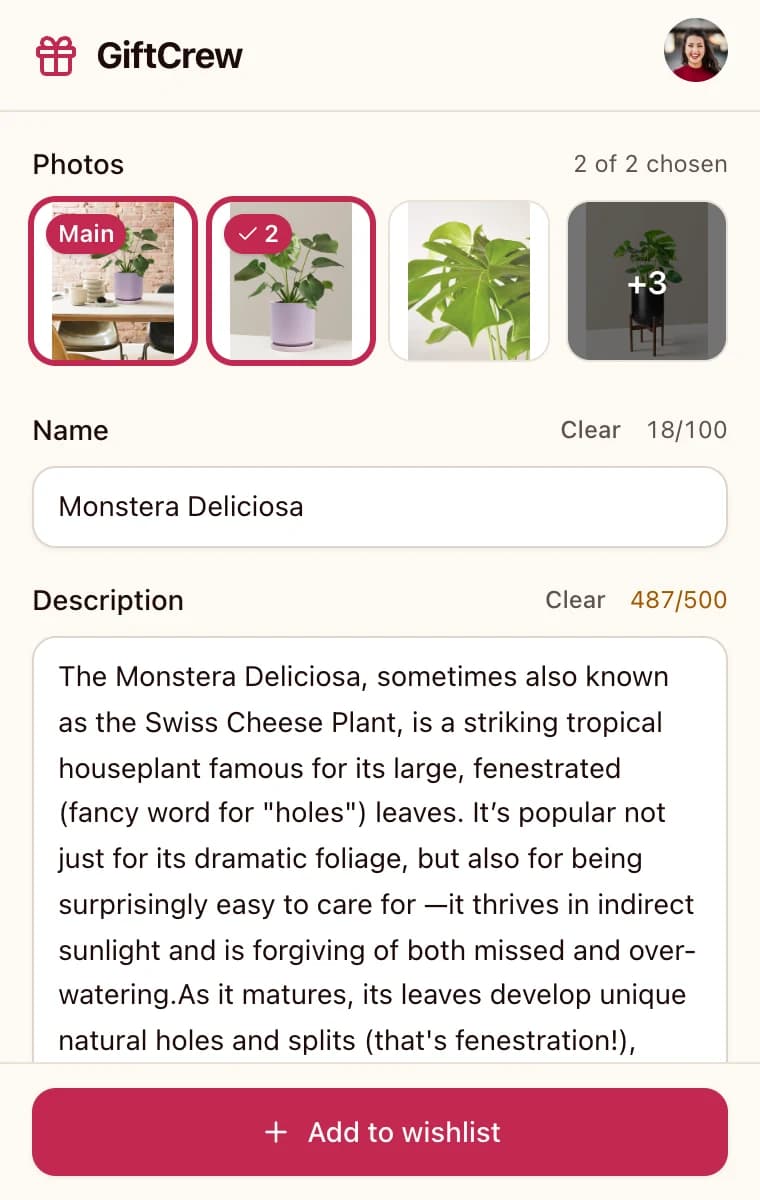
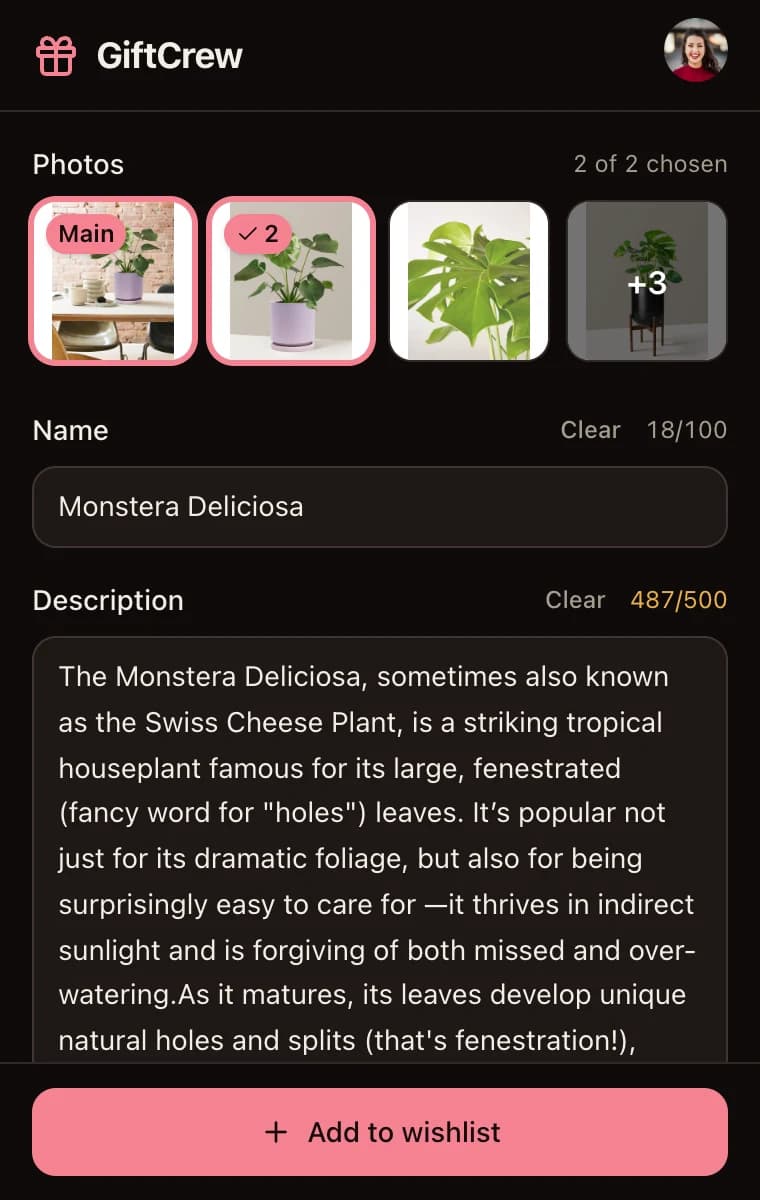
Open a product page and click the GiftCrew button in your toolbar, or press Alt+Shift+G. A panel opens with the product’s name, description and photos.
- Step 3
Choose, Edit and Add
Pick up to two photos, edit anything you like, and choose your wishlist or an event wishlist you’re celebrated in. Click Add to wishlist, then View in GiftCrew to see it on your list.
What the Extension Fills In
Everything comes from the page you have open, and you can change any of it before you add.
Name and Description
The product’s name and the shop’s description, ready to edit or shorten.
Up to Two Photos
Choose from the product’s photos. The first one you pick becomes the main photo.
The Product Link
Saved with the item, so whoever buys it for you lands on the exact product.
Your Wishlist or an Event’s
Add to your own wishlist, or to an event wishlist you’re celebrated in, like a wedding or baby shower list.
Already on Your List?
If the product is already on your wishlist, the extension tells you, so you don’t add it twice.
Works Where Links Don’t
It reads the page you already have open, so it also works on shops that block automated reading.
Privacy and Permissions
The extension looks at a page only when you ask it to.
What It Does and Doesn’t Do
- Reads a page only when you click the GiftCrew button or press Alt+Shift+G, and only that tab.
- Doesn’t track your browsing.
- Sends GiftCrew only the product details you choose to save.
- Can be disconnected any time from the extension’s account menu.
Permissions It Asks For
- activeTab
- Read the tab you’re on, only after you click the button or use the shortcut.
- scripting
- Collect the product details from that tab.
- storage
- Keep you connected to your GiftCrew account.
- giftcrew.app/extension/connected
- Finish connecting to your account. It runs on that one page only.
On Your Phone?
The extension is for desktop browsers. On your phone, open Add to Wishlist on the GiftCrew website or in the Android app and paste a product link into Fill in from a link. GiftCrew fills in the name, description and photos for you.
See how link fill-in worksFrequently Asked Questions
Is the GiftCrew extension free?
Yes. The extension is free in every browser it supports. The gifts you add count toward your wishlist, which holds up to 5 items on Free and up to 50 on Pro.
Which browsers does the extension work in?
Chrome, Microsoft Edge, Brave, Opera, Firefox, and Safari on Mac. Brave and Opera use the Chrome version. The extension is for desktop browsers, so on a phone, paste a product link on Add to Wishlist in the GiftCrew app or website instead.
Does the extension track my browsing?
No. It reads a page only when you click the GiftCrew button or press Alt+Shift+G, and only the tab you’re on. It sends GiftCrew only the product details you choose to save.
Why use the extension if GiftCrew can fill in from a link?
It saves copying and pasting, because you add the product from the page you’re already on. And since it reads that open page, it also works on shops that block automated reading, where link fill-in can only add the link and a name taken from it.
How do I connect the extension to my account?
Click the GiftCrew button and choose Connect GiftCrew. GiftCrew opens in a tab; check it’s your account, click Connect this browser, and it takes you back to the shop. If you’re not signed in, sign in with Google or email, or create a free account, first. You can disconnect any time from the extension’s account menu.
Can I add gifts to an event wishlist?
Yes. Before you add a product, choose where it goes: your own wishlist, or the wishlist of an event you’re celebrated in, like your wedding or baby shower. The extension also tells you if a product is already on your wishlist.
Get the GiftCrew Extension
Free for Chrome, Edge, Brave, Opera, Firefox and Safari on Mac. Connect it once, then add gifts from the shops you browse.
- ChromeAlso Brave and OperaComing soon
- EdgeComing soon
- FirefoxComing soon
- SafariOn MacComing soon
You’ll need a GiftCrew account to connect it. Create a free account
Explore More
Add Gifts From Any Shop
Paste a product link on the website or in the Android app, and GiftCrew fills in the details.
Learn moreStep-by-Step Guide
How to add gifts from online shops, with tips on photos, editing and event wishlists.
Learn moreBirthday Wishlists
Share your wishlist with friends and family, who claim gifts in secret.
Learn more